Warrior X
Written By Support Team
📄 Download PDF Version: Attached Below 🢃
WarriorX Installation.pdf
491.4 KB• Document
Installation Video
Product Overview: WarriorX100 is a standalone battery-powered GPS tracking device designed for asset tracking and fleet management with cellular connectivity and built-in GPS positioning.
SIM Card Requirements:
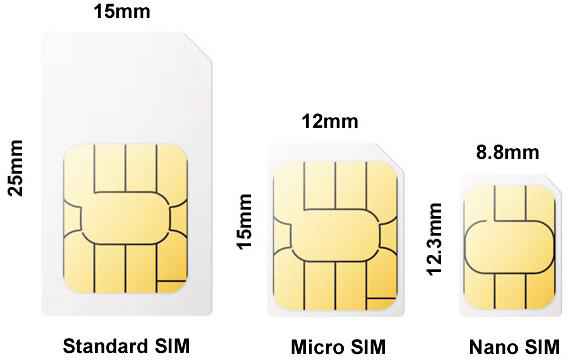
Format: Nano SIM card compatible
Setup: Data plan enabled, no PIN code, sufficient balance
SMS Support: Required for SMS commands and device setup
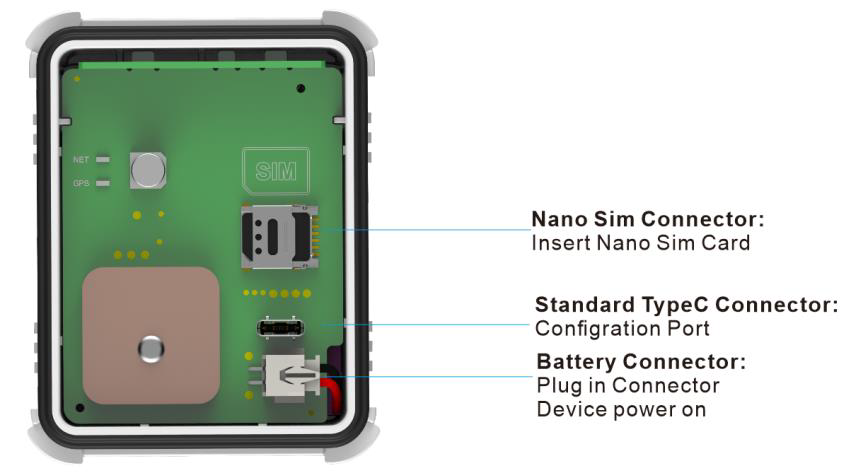
Installation: Power off device, open SIM drawer, insert following board indication, close drawer, reconnect battery
LED Status Indicators:
Network Indicator (Red): Flashing (searching network) / Solid (connected)
GNSS Indicator (Red): Flashing (satellite searching) / Solid (positioned)
Device Interface: Nano SIM connector, Standard Type-C connector (configuration), Battery connector
Key Features:
Standalone Operation: Battery-powered for independent asset tracking
Cellular Connectivity: Real-time data transmission via cellular network
GPS Tracking: Precise location monitoring with GNSS positioning
Compact Design: Portable form factor for versatile deployment
Configuration Port: Type-C connector for device setup and management
Application: Ideal for asset tracking, vehicle monitoring, equipment security, and fleet management where hardwired installation isn't feasible. Perfect for trailers, equipment, temporary tracking needs, or backup tracking solutions.
Unique Position: Entry-level standalone tracking solution in the ZenduIT lineup, providing basic GPS tracking functionality without the complexity of multi-camera surveillance systems or vehicle integration requirements
Warrior X Installation
Installation Requirements:
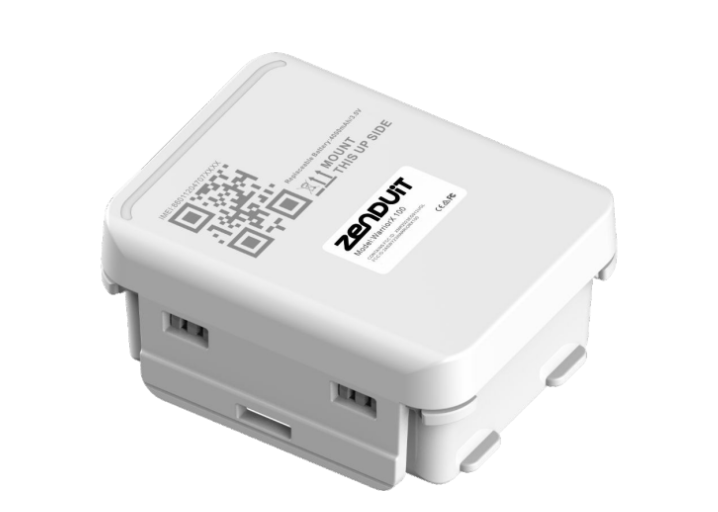
Positioning: Label must face upwards toward sky, avoid metal obstructions
Orientation: Internal GNSS antenna sensitive - can tilt up to 45° on any axis but top must face up
Placement: Avoid metal surfaces, moving parts, or heat sources
GPS Accuracy: Proper orientation critical for tracking accuracy
Installation Steps:
Step 1: Open the Device Cover
Carefully remove the device cover.
Note: The cover may feel tight due to its waterproof design.
Step 2: Insert Battery & SIM Card
Connect the battery to the designated port.
Insert the SIM card into the SIM slot.
Step 4: Close & Seal the Cover
Place the cover back securely.
Ensure it is fully closed to maintain waterproof protection.
Step 5: Activate the Device
Remove the small magnet from the left side of the device to trigger the Hall Effect Sensor and activate the device.
Insert the magnet on the right side for temperature detection.
Note: The right side will feel looser.
If the magnet falls out, the device will only measure temperature.
Step 6: Install the Device
You can install the device using any of the following methods:
3M adhesive sticker
Zip ties
Custom-designed metal bracket
Using the Bracket
Align the two upward-facing sides of the bracket with the matching sides of the device.
Secure using screws or magnets for quick installation.
General Troubleshooting Guide:
Connection Issues: Check APN/IP settings, SIM network support, data service, IMEI registration
Offline Status: Verify power source, network coverage, SIM balance, data usage limits
Location Problems: Ensure proper orientation, check satellite coverage, account for urban drift
Location Deviation: Normal in weak GNSS areas with tall buildings
Still need help? Ask the team