ZenTRACK Knight
Written By Support Team
📄 Download PDF Version: Attached Below 🢃
Installation Zentrack KnightX.pdf
212.6 KB• Document
ZenTRACK Knight is an advanced standalone battery-powered GPS tracking device with integrated touch switch functionality, designed for personal safety and asset tracking applications.
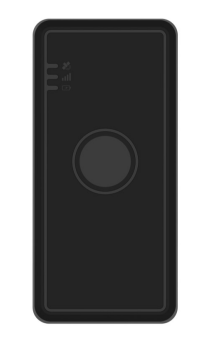
Device Design:
Compact Form Factor: Sleek, rectangular design with integrated touch button
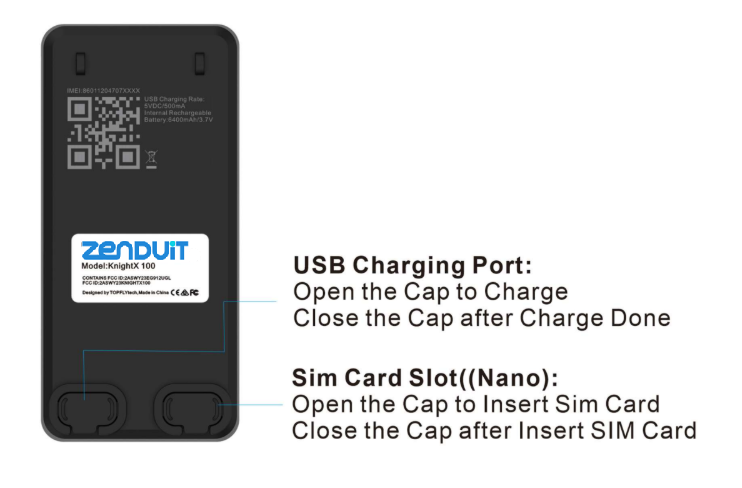
Dual Access Ports: USB charging port and Nano SIM card slot on bottom
LED Status Indicators: Multi-color status lights for comprehensive device monitoring
Touch Interface: Integrated touch switch for user interaction and emergency functions
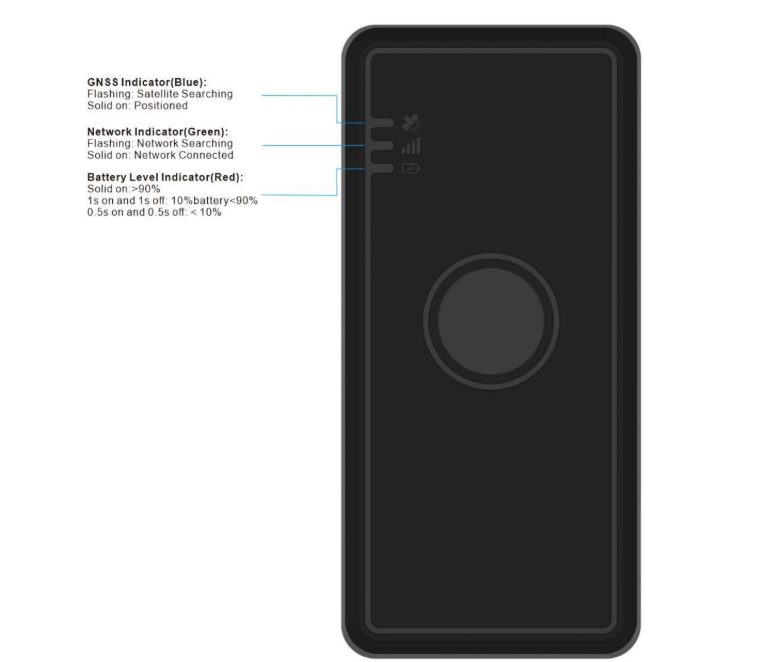
LED Status Indicators:
GNSS Indicator (Blue): Flashing (satellite searching) / Solid (positioned)
Network Indicator (Green): Flashing (network searching) / Solid (connected)
Battery Level Indicator (Red):
Solid: >90% battery
Blinks once/second: 10-90% battery
Blinks twice/second: <10% battery
Key Features:
Personal Safety: SOS/panic button functionality for emergency situations
User-Friendly: Simple touch interface for all device interactions
Status Awareness: Comprehensive LED feedback system
Robust Design: Standalone operation with extended battery life
Emergency Communication: Morse code vibration patterns for discreet alerts
Installation
SIM Card Requirements:
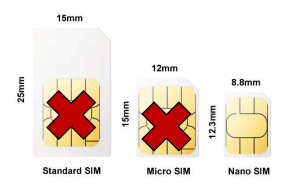
Format: Nano SIM card compatible
Setup: Data plan enabled, no PIN code set, sufficient balance
SMS Support: Required for SMS command functionality
Installation: Remove bottom lid, insert following device orientation, push until click/flush
Touch Switch Functions:
Power On (Default Enabled):
Activation: Press and hold button >6 seconds
Response: Device vibrates 1 second, all LEDs turn on
Status Check: Click button 5 times in <5 seconds for 100-second status display
Power Off (Default Enabled):
Activation: Click 9 times in <9 seconds, hold on last press for 3 seconds
Response: Device vibrates and powers off
Cooldown: Can only power on after 120 seconds
Panic/SOS (Default Disabled):
Activation: Hold button >6 seconds when powered on
Response: Device vibrates in morse code, sends SOS alert to platform
Battery Management:
Charging Requirements: Minimum 1A current recommended (lower supported but slower)
Critical Voltage: 3.3V triggers low power shutdown warning
Recovery Charging: 24 hours charging required after complete battery depletion
Power On Threshold: Requires minimum 3.4V battery voltage for power on command
Device Health Status Check:
When powered on, click button 5 times in <5 seconds for real-time status:
GNSS Status: GPS disabled (LED off), enabled (solid), searching (blinks)
Network Status: Connected (solid), searching (blinks)
Battery Level: Visual indicator of remaining charge
Unique Position: Premium personal safety tracker in the ZendIT lineup, combining advanced GPS tracking with integrated touch interface and emergency response capabilities, distinguishing it from standard asset tracking devices.
Installation Notes: Simple setup process with bottom-access ports for SIM card and charging, designed for user-friendly operation without technical installation requirements.
Still need help? Ask the team