Remote BLE Relay Control for Ignition Cut-off on ZenduOne
Written By Philip Stanoev
This comprehensive guide covers the Remote BLE Relay Control feature in ZenduONE, enabling fleet managers to remotely control vehicle ignition systems using Bluetooth Low Energy (BLE) technology. The feature provides enhanced security capabilities allowing authorized users to remotely disable or restore vehicle ignition for unauthorized usage prevention and improved asset protection.
Overview
The Remote BLE Relay Control feature provides fleet managers with advanced vehicle security capabilities through remote ignition control using Bluetooth Low Energy technology. This functionality enables authorized personnel to remotely cut off vehicle ignition systems, preventing unauthorized vehicle access or enhancing asset security through centralized control mechanisms integrated within the ZenduONE platform.
Key Benefits
Enhanced Security Capabilities
Remote Ignition Control: Provides comprehensive remote control over vehicle ignition systems, helping prevent unauthorized access, theft prevention, and asset protection through centralized security management.
Responsive Technology Integration
BLE Technology Advantages: Bluetooth Low Energy technology enables fast, responsive ignition control directly through ZenduONE platform with secure, short-range communication capabilities for immediate response and reliable operation.
Improved Fleet Management
Asset Control: Fleet managers can remotely ensure vehicles operate only under authorized personnel supervision, providing comprehensive control over fleet utilization and security protocols through integrated management systems.
Remote BLE Relay Control Usage Procedures
Step 1: Vehicle Control Panel Access
Platform Login: Log in to ZenduONE platform using authorized credentials and access permissions.
Navigation: Navigate to Assets or Vehicles section on the main dashboard interface.
Vehicle Selection: Select specific asset or vehicle for which remote relay control activation is required.
Step 2: Ignition Cut-off Activation
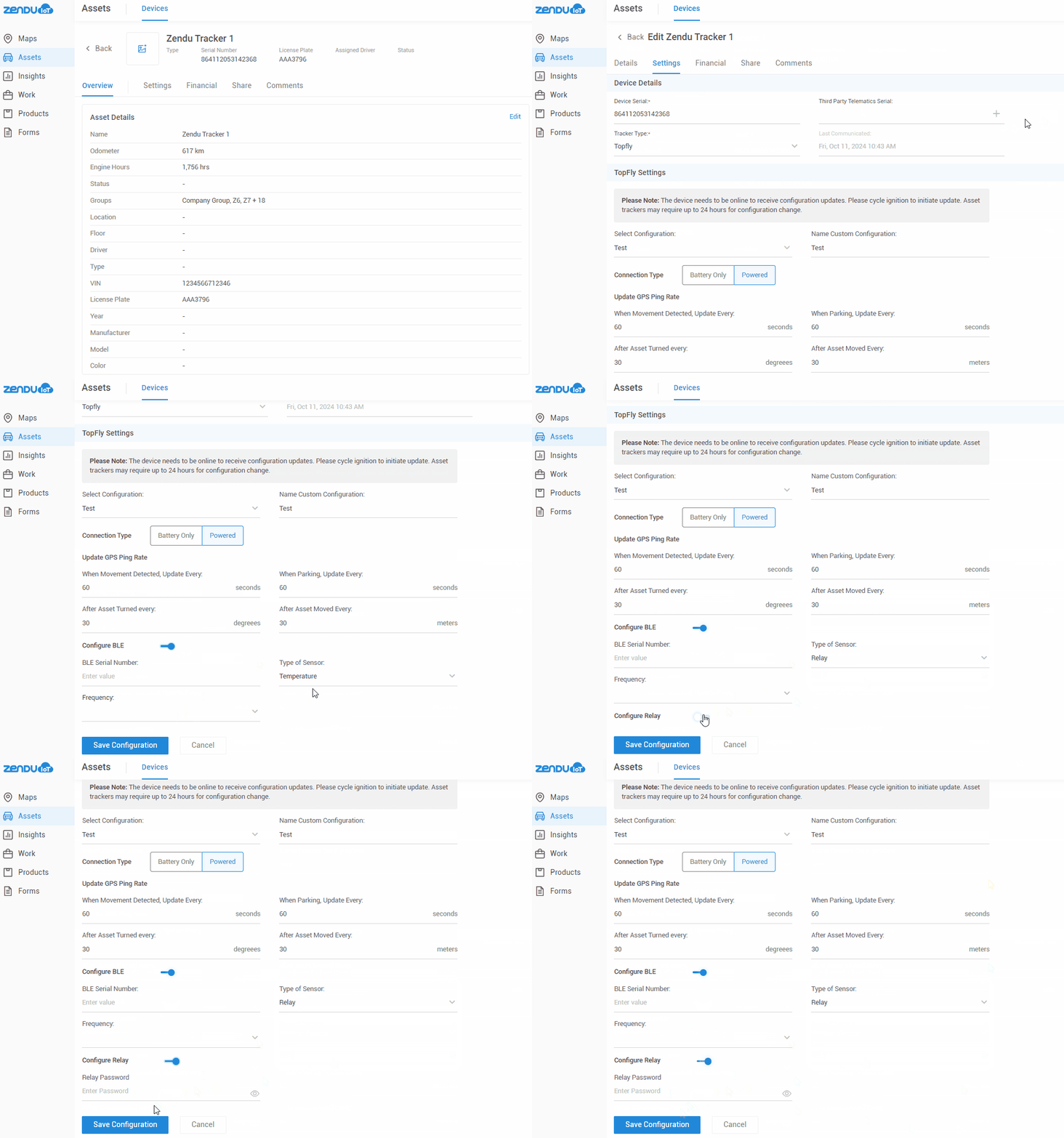
Control Section Access: Within vehicle detail page, locate Remote BLE Relay Control section for ignition management options.
Cut-off Selection: Select Ignition Cut-off option from available control mechanisms.
Activation Confirmation: Confirm ignition cut-off by selecting Activate button to initiate remote control sequence.
BLE Relay Execution: BLE relay control remotely triggers ignition cut-off, securing the vehicle and preventing unauthorized operation.
Step 3: Ignition Control Restoration
Restoration Access: To restore ignition functionality, access the same Remote BLE Relay Control section within vehicle interface.
Restore Selection: Select Ignition Restore option and confirm the restoration action through interface prompts.
Re-enablement Process: BLE relay control re-enables vehicle ignition system, allowing normal operational functionality and authorized vehicle use.
Authorization Note: Only authorized users with proper permissions can activate or restore ignition using BLE relay control feature for security and access control purposes.
Frequently Asked Questions
Technology and Functionality
Q: How does BLE technology enhance ignition control capabilities? A: BLE technology enables secure, short-range communication between ZenduONE platform and relay devices, ensuring quick and secure ignition control with reliable connectivity and responsive command execution.
Q: Does this feature require additional hardware installation? A: Yes, vehicles must be equipped with compatible BLE relay devices that interface with ZenduONE for ignition control functionality. Proper hardware installation is required for feature operation.
Fleet Implementation
Q: Can ignition control be activated for all fleet vehicles? A: Feature availability depends on BLE relay device installation in each vehicle. Only properly equipped vehicles can utilize remote ignition control functionality through the ZenduONE platform.
Operational Considerations
Q: Is ignition cut-off permanent until manually restored? A: Yes, once ignition is remotely disabled, it remains inactive until authorized user restores control through ZenduONE platform interface, ensuring secure vehicle immobilization.
Q: Can ignition control be managed from mobile devices? A: Yes, ZenduONE mobile access enables authorized users to manage ignition control remotely through mobile interfaces, providing on-the-go BLE relay control capabilities for field operations.
Technical Considerations
Hardware Requirements
BLE Relay Compatibility: Vehicles require compatible BLE relay device installation that interfaces properly with ZenduONE platform for successful ignition control implementation and reliable operation.
Security Protocols
Authorization Management: Feature includes comprehensive authorization controls ensuring only permitted users can access and operate remote ignition control functions for enhanced security and access management.
Communication Range
BLE Technology Limitations: Bluetooth Low Energy technology operates within specific range parameters requiring proximity considerations for reliable communication between platform and vehicle relay systems.
Still need help? Ask the team