Driver Identification FOB Keys on ZenduOne
Written By Philip Stanoev
This comprehensive guide covers the Driver Identification FOB Key feature in ZenduONE, enabling fleet managers to assign unique Bluetooth Low Energy (BLE) key identifiers to drivers for secure access control and accurate driver tracking. The system provides enhanced security and accountability through seamless integration with asset trackers without requiring additional hardware installations.
Overview
The Driver Identification FOB Key feature enables fleet managers to implement secure driver authentication through unique BLE key identifiers. This technology ensures only authorized drivers operate fleet assets while providing comprehensive tracking capabilities and enhanced security protocols through seamless integration with existing asset tracking infrastructure.
Key Benefits
Enhanced Security Protocols
Secure Access Control: FOB keys provide robust security mechanisms and precise control over asset usage, ensuring unauthorized personnel cannot operate fleet vehicles through authenticated access requirements and unique identifier verification.
Accurate Driver Tracking Capabilities
Individual Driver Monitoring: System enables precise linking of drivers to specific assets with comprehensive activity tracking based on individual driver usage patterns, providing detailed operational insights and utilization data.
Improved Accountability Framework
Driver Responsibility: Unique BLE key number assignment to each operator establishes clear accountability measures through seamless asset tracker integration, enabling comprehensive monitoring and responsibility tracking for fleet operations.
Driver Identification FOB Key Setup Procedures
Step 1: User and Driver Page Access
Platform Login: Log in to ZenduONE platform using authorized credentials and administrative access permissions.
Navigation: Navigate to Users page from main dashboard interface for driver management and configuration access.
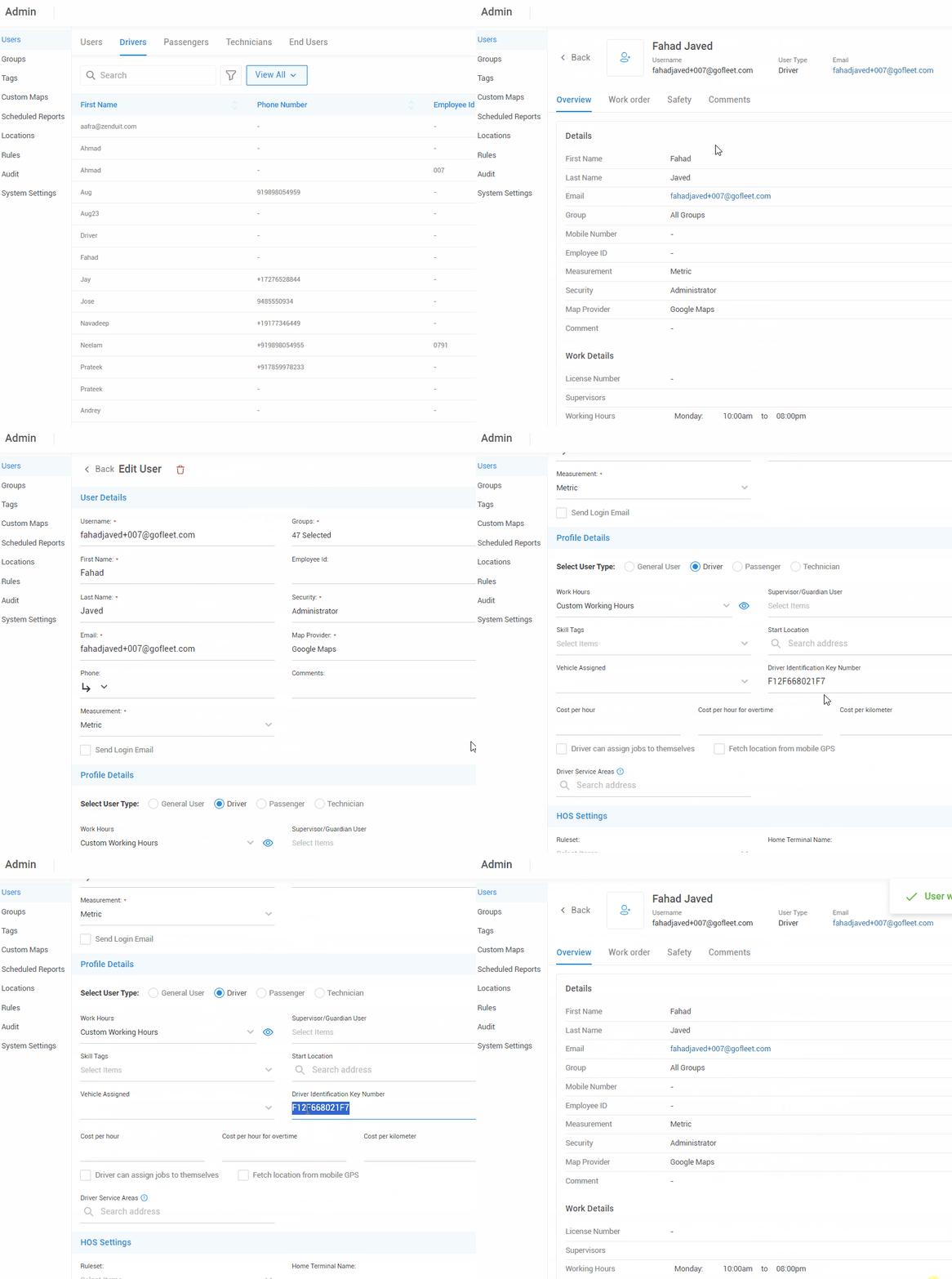
Step 2: Driver FOB Key Assignment Process
Driver Section Access: Select Drivers section under Users menu for driver-specific configuration and management options.
Driver Selection: Choose "Add New Driver" for new driver creation or select existing driver profile for FOB key assignment updates.
FOB Key Configuration: In driver details form, locate "Driver Identification Key Number" field for unique identifier assignment.
Key Number Entry: Enter unique BLE FOB key number assigned to specific driver in designated field for system recognition and tracking.
Assignment Completion: Click Save to establish permanent link between BLE FOB key and driver profile for operational use and tracking.
Step 3: BLE FOB Key Operation and Authentication
Authentication Process: Once assigned, BLE FOB key enables drivers to authenticate identity when operating assets without requiring additional hardware installations or complex procedures.
Activity Logging: ZenduONE automatically logs driver activities associated with each BLE key, enabling accurate monitoring, reporting, and operational analysis for comprehensive fleet management.
FOB Key Management and Modification
Editing FOB Key Assignments
Key Number Updates: To edit FOB key number for existing driver, navigate to Users > Drivers, select target driver, update "Driver Identification Key Number" field with new identifier, and save changes for system recognition.
Removing FOB Key Assignments
Key Removal Process: To remove FOB key assignment, clear "Driver Identification Key Number" field completely and save changes to eliminate driver-key association from system records.
Administrative Authorization: Only authorized users with administrative privileges can edit or delete FOB key numbers, ensuring security and access control for sensitive driver identification management functions.
Frequently Asked Questions
Lost FOB Key Management
Q: What if a driver loses their FOB key?
A: Assign new BLE FOB key number in "Driver Identification Key Number" field and save changes. System immediately recognizes new key assignment for continued operational access and driver authentication.
Operational Requirements
Q: Can a driver operate assets without an assigned FOB key?
A: FOB key requirement depends on organizational settings and administrative configuration. Consult system administrator to determine if FOB key identification is mandatory for asset operation within your fleet management framework.
Reporting and Data Integration
Q: Is FOB key information included in driver activity reports?
A: Yes, BLE FOB key data integrates into comprehensive reporting systems, enabling accurate tracking and verification of driver activity with detailed operational analytics and accountability measures.
Hardware Requirements
Q: Is additional hardware required with asset tracker to operate FOB key?
A: No additional hardware required. ZenduONE FOB key utilizes Bluetooth Low Energy (BLE) technology communicating directly with asset tracker via BLE connection to log and verify driver identity seamlessly without supplementary equipment installations.
Technical Considerations
BLE Technology Integration
Seamless Communication: FOB keys utilize Bluetooth Low Energy technology for direct communication with asset trackers, providing reliable authentication and tracking capabilities without complex hardware requirements or extensive system modifications.
Security Framework
Access Control: Unique identifier assignment ensures comprehensive access control with administrative oversight for FOB key management, maintaining security protocols and preventing unauthorized system modifications or driver impersonation.
Reporting Capabilities
Data Analytics: System provides comprehensive reporting capabilities including FOB key usage data, driver activity correlation, and operational analytics for enhanced fleet management decision-making and accountability tracking.