ZenduONE Public API Integration Guide
Connect your own systems to ZenduONE with the Public REST API: get credentials and make your first call.
Written By Vishal Singh
Overview
The ZenduONE Public REST API connects your own systems, such as an ERP, a data warehouse, Power BI or an AI assistant, to your fleet data: devices, drivers, trips, safety events, video, maintenance and dispatch. It returns only your own company's data.
Address:
https://trax-public-api.zendu.one/v1Sign-in: client ID and secret, traded for a token that lasts 1 hour
Access control: scopes per area, read or write
Rate limit: about 120 requests per minute per credential
Documentation: trax-public-api.zendu.one/docs
AI assistants: ZenduONE MCP server
A credential can't be limited to particular groups or vehicles: it sees every record in the company that its scopes allow. Keep this in mind before giving a partner API access.
Public REST API
Get credentials
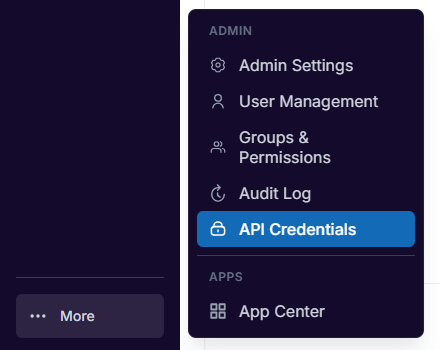
If your ZenduONE account shows API Credentials under More at the bottom of the left menu, a company admin can create credentials there. If it does not, contact servicedesk@zenduit.com for access.
Click More, then API Credentials under Admin. You can also open Admin Settings and choose the API Credentials card.
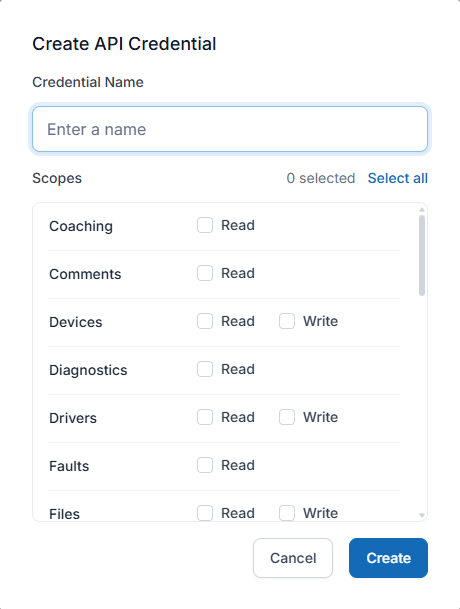
Click Create credential.
Enter a Credential Name that says what uses it, for example "Power BI nightly sync".
Under Scopes, tick Read or Write for each area the integration needs. Avoid Select all unless the integration needs everything.
Click Create, then copy the Client ID and Client Secret into your secret store. The secret is shown only once. Click Done.
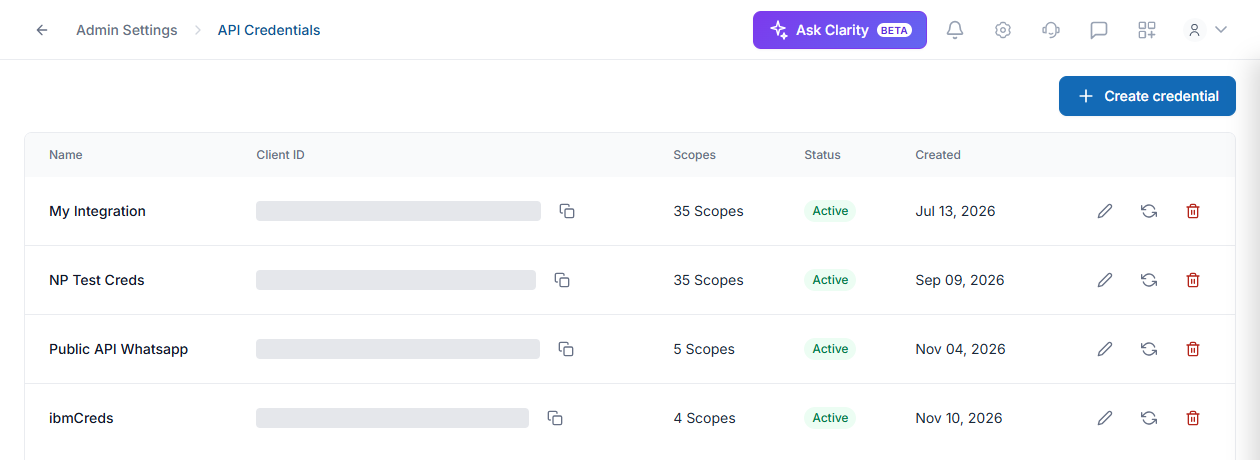
Each credential in the list has Edit (rename or change scopes), Rotate (issue a new secret, shown once) and Delete (remove it permanently) on the right. Create one credential per integration so you can switch one off without breaking the others.
Get a token and make your first call
Trade the client ID and secret for an access token, then send it with every request. Tokens last one hour: cache one and fetch a new one when it expires. Leave out scope to receive every scope the credential has.
curl -sS 'https://service-prod.zendu.one/Public/OAuth/Token' \
  -d grant_type=client_credentials \
  -d client_id=$CLIENT_ID \
  -d client_secret=$CLIENT_SECRET \
-d scope='devices:read trips:read'curl -sS 'https://trax-public-api.zendu.one/v1/devices?limit=2' \
-H "Authorization: Bearer $ACCESS_TOKEN"Every reply has data (what you asked for) and meta (a request_id, plus count, has_more and next_cursor for lists). Lists return up to 1,000 rows; pass next_cursor back as cursor for the next page. Date-based lists such as trips and safety events default to the last 30 days, and most allow at most 31 days per request.
Use cases
Live fleet board in Power BI: list devices with ignition, speed and last known location. Scope:
devices:read.Weekly mileage report: list trips and vehicle summaries. Scopes:
trips:read,summaries:read.Monday safety digest: list safety events for last week. Scopes:
safety:read,drivers:read.Incident video for an insurance claim: request video, then check the task status. Scopes:
media:write,media:read.Fault codes to maintenance requests: list faults and create a maintenance request. Scopes:
faults:read,maintenance:write.Jobs from your order system: create a job and assign a vehicle. Scope:
jobs:write.Quarterly IFTA mileage: list IFTA summaries. Scope:
ifta:read.
Keep credentials safe
Keep the secret in a secrets manager or your integration tool's secure settings, never in code, spreadsheets, email or chat.
Never put the secret, or a token from it, in a web page, mobile app or ZenduONE app: anyone can read those.
Give each credential only the scopes it uses, rotate the secret when someone who knew it leaves, and delete credentials nobody uses.
Resources
Interactive API reference, where Authorize lets you try calls with your token
Entity reference for every field and filter
openapi.json to import into Postman or Insomnia
MCP server setup for Claude, n8n and other AI assistants
Support
API access and credentials: servicedesk@zenduit.com
Integration and development questions: integrations@zenduit.com
Was this helpful?
Still need help? Ask the team