How to Verify Geotab’s ELD Certification for Canadian Compliance
Written By Reman Bhardwaj
Overview
Electronic Logging Devices (ELDs) are required to meet Transport Canada’s compliance standards for use within Canada. Customers or partners may request confirmation that Geotab is a certified ELD under these regulations.
This article explains how to verify Geotab’s certification status directly from the official Transport Canada website.
Summary
Geotab is an officially Transport Canada–certified ELD provider. You can verify this at any time by visiting the official Transport Canada website and checking the most recent list of approved ELDs.
Steps to Verify Certification
Visit Transport Canada’s official ELD list
Go to the following link:
🔗 List of Certified Electronic Logging Devices – Transport CanadaLocate Geotab on the list
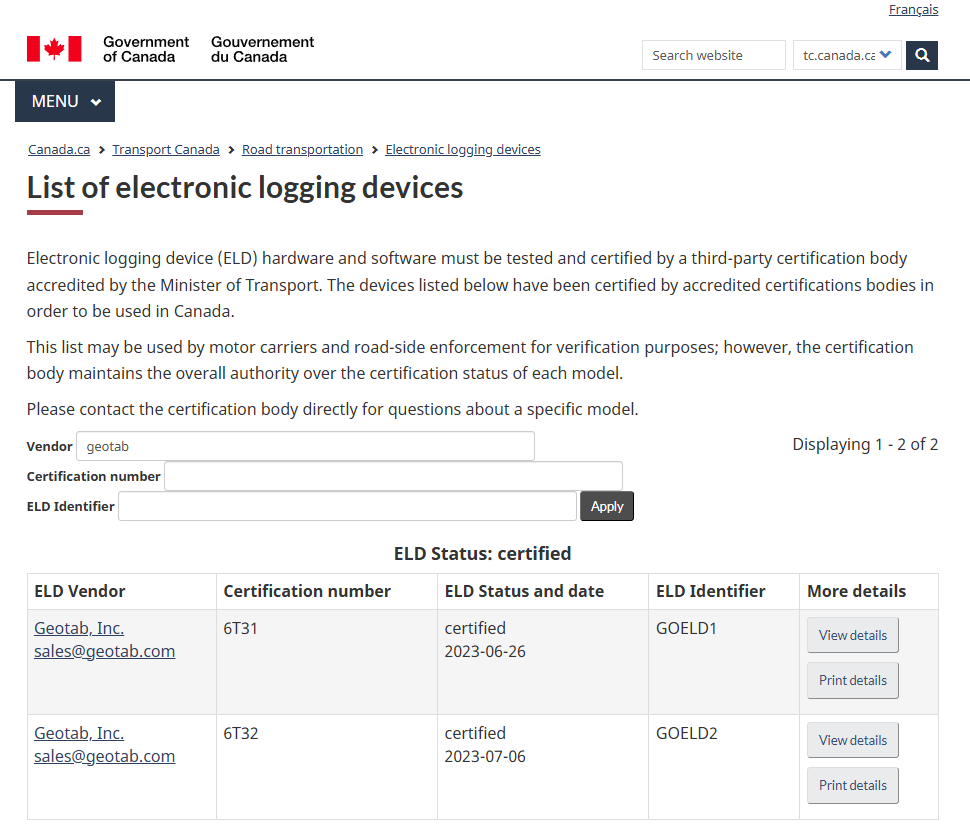
On the page, you will find a table listing all ELDs that have been certified by Transport Canada.
Click on Vendor, Select Geotab.
You should see the Geotab® GO Device listed among the certified ELDs.
Review Certification Details
The listing includes:Manufacturer name
ELD Status and date
Certification number
This confirms that Geotab has met all Transport Canada requirements for ELD compliance.
Additional Resources
Geotab Community Article:
For more insights and official communication about Geotab’s Transport Canada ELD certification and compliance, please visit:
🔗 Geotab Blog – Transport Canada ELD Mandate
Additional Information
Certification information is maintained and updated directly by Transport Canada.
If you have questions regarding certification validity or documentation, refer to the Transport Canada website or contact their support.
Was this helpful?
Still need help? Ask the team