ZenTRACK OBD - Beacon Configuration
Written By Support Team
Eye Sensor & Eye Beacon Integration
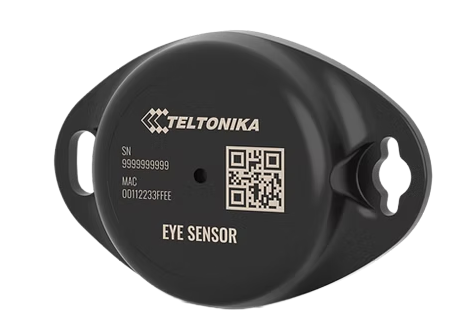
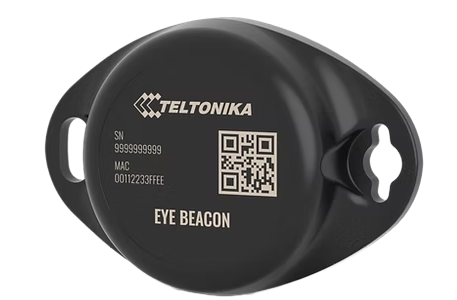
Applies to: ZenTRACK OBD devices using ZenduIT default configuration files (12V/24V BLE).
ZenTRACK OBD can act as a BLE gateway for Teltonika Eye Sensor and Eye Beacon devices:
Eye Sensor (ZenEye Sensor)
A multi-sensor device that provides:BLE identification
Temperature
Humidity
Door status (reed/magnet sensor)
Magnet/attachment detection (mounted vs unmounted)
Eye Beacon (ZenEye Beacon)
A simpler device that provides:BLE identification / presence
Suitable for asset / equipment tagging where only ID is required.
In the Teltonika hardware, Eye devices are handled via dedicated Eye Sensor and Eye Beacon configurations, separate from generic iBeacon, KSensor, and Eddystone settings.
Configuration on ZenTRACK OBD (Teltonika Side)
For ZenTRACK OBD, you do not need to manually configure Eye Sensor or Eye Beacon datapayloads:
The default configuration files provided by ZenduIT (and available on the Teltonika FOTA portal) already:
Enable the appropriate Eye Sensor / Eye Beacon profiles.
Configure the device to scan, decode, and forward Eye payloads.
This setup is applied during the fulfillment process when:
Firmware is updated to the approved version.
The correct
FM_OBD_12v_BLE.cfgorFM_OBD_24v_BLE.cfgfile is loaded.
Important:
There is no need for installers or customers to manually adjust:
iBeacon / KSensor / Eddystone hex offsets
Eye Sensor / Eye Beacon datapayload parsing
These are handled centrally through ZenduIT’s standard configuration files.
As long as the device is using the approved ZenduIT config, ZenTRACK OBD will automatically:
Discover nearby Eye Sensors and Eye Beacons.
Parse their values (ID, temperature, humidity, door state, magnet state) where applicable.
Forward the information to the backend platform.
Representation in ZenduOne Platform
On ZenduOne, Teltonika Eye devices are modeled as independent assets, not just hidden sensors:
Each ZenEye Sensor or ZenEye Beacon is created as a new asset.
Their Tracker Type in ZenduOne is set to: BLE Beacon.
Typical behavior:
ZenTRACK OBD acts as the gateway tracker installed in the vehicle.
ZenEye Sensors / Beacons are modeled as BLE Beacon assets associated with that gateway.
This allows:
Separate naming and grouping (e.g., “Trailer Door Sensor – Rear Left”).
Asset-level history and reporting for each sensor/beacon.
Clear mapping between vehicle (OBD gateway) and attached BLE assets.
From an operational perspective:
When you see a BLE Beacon-type asset in ZenduOne with a ZenEye-related name, it is an Eye Sensor or Eye Beacon whose data is being forwarded by a ZenTRACK OBD (or other ZenTRACK gateway).
You manage the physical installation of the Eye device at the trailer/door/equipment, and ZenTRACK OBD handles the wireless collection and transmission of its data.
Key Takeaways
Use ZenduIT default config files – they already handle Eye Sensor and Eye Beacon; no manual BLE datapayload tuning is required.
Eye devices are separate assets in ZenduOne with tracker type BLE Beacon, giving clear visibility and history.
ZenTRACK OBD’s role is to:
Act as the BLE gateway in the vehicle.
Forward Eye Sensor/Beacon telemetry to ZenduOne according to the standard configuration.
——————————————————————————————————-
All Generic Beacons
All beacons (KKM, TopFly and others).
iBeacon
• Generic Eddystone (UID/TLM)
• KSensor (Eddystone Frame Type 0x21)
The goal is to define default configuration rows that allow Teltonika devices to capture the advertised payload in a consistent way, while remaining flexible enough to support different beacon configurations.
1. General Concepts
In Teltonika’s Advanced BLE / Beacon Capturing configuration, each row defines a rule to match specific beacon advertisements and extract relevant data. The main fields are:
Manufacturer ID – pattern (in hex) used to identify the beacon type.
Manufacturer ID Offset – byte offset (within the advertisement data) where the Manufacturer ID pattern starts.
Manufacturer ID Size – number of bytes of the Manufacturer ID used for matching.
Beacon ID Offset / Size – position and length of the logical beacon identifier (UUID, UID, or other ID) within the payload (can be 0 to use MAC as ID).
Additional Data Offset / Size – position and length of the data block that should be captured and forwarded in the AVL record.
For some devices (especially third‑party beacons with unknown structure), a common pattern is to capture the entire advertisement and scan response using Additional Data Offset = 0 and Additional Data Size = 70. For known beacon formats, we can capture only the meaningful sensor payload using more precise offsets.
2. iBeacon Configuration (Generic / Any UUID, Major, Minor)
iBeacon frames use the Apple Manufacturer ID and a fixed internal structure. Teltonika’s recommended pattern uses the Manufacturer ID sequence 4C000215 (Apple Company ID 0x004C, Beacon Type 0x02, Length 0x15). With the configuration below, Teltonika will match any valid iBeacon regardless of the configured UUID, Major, or Minor values, and capture the full identifier.
Notes:
• Manufacturer ID Offset 5 and Size 4 ensure that only true iBeacon frames (4C000215) are matched.
• Beacon ID Offset 9, Size 20 maps to the 16‑byte UUID plus 2‑byte Major and 2‑byte Minor.
• Additional Data Offset 0, Size 70 captures the whole advertising and scan response payload, making parsing flexible on the backend.
3. Generic Eddystone Configuration (UID and TLM)
Eddystone frames (UID, TLM, EID, etc.) share the same 16‑bit Service UUID 0xFEAA (AA FE in little‑endian). To create a generic configuration that captures both UID and TLM frames, we match only on the Service UUID and ignore the frame type. The frame type is then interpreted in the backend parser.
Notes:
• Manufacturer ID AAFE0000 with Offset 9 and Size 2 matches only the Service UUID bytes AA FE, allowing any Eddystone frame type.
• Beacon ID Offset 13, Size 16 is suitable for treating the UID namespace/instance as an identifier when the frame is UID; for TLM frames this is simply extra payload bytes.
• Additional Data Offset 0, Size 70 captures the full advertisement, including frame type, version, and telemetry fields.
If a configuration dedicated only to Eddystone TLM is desired, the Manufacturer ID can be changed to AAFE2000 with Manufacturer ID Size 3, which matches AA FE 20 (Service UUID + TLM frame type). The remaining offsets can stay the same.
4. KSensor Configuration (Eddystone Frame Type 0x21)
KSensor beacons use an Eddystone‑like frame structure with the same Service UUID (0xFEAA) but a custom frame type 0x21. The internal payload is a structured sensor block containing mask bits, voltage, temperature, humidity, accelerometer values, cutoff and PIR flags, light level, record type, and record count.
KSensor AD payload structure (simplified):
Service UUID (2 bytes): 0xAAFE
Frame Type (1 byte): 0x21
Sensor mask (2 bytes): flags for voltage, temperature, humidity, accelerometer, cutoff, PIR, light, etc.
Voltage (2 bytes): battery voltage
Temperature (2 bytes): temperature value
Humidity (2 bytes): humidity value
Axis X (2 bytes): accelerometer X
Axis Y (2 bytes): accelerometer Y
Axis Z (2 bytes): accelerometer Z
Cutoff alert (1 byte): cutoff status flags
PIR alert (1 byte): PIR status flags
Light level (2 bytes): light level
Record type (1 byte): record type
Record count (1 byte): record count
In the Teltonika Advanced Mode configuration, KSensor is best handled by matching the Eddystone UUID plus the custom frame type 0x21, and then capturing only the meaningful sensor block with a precise offset and size.
Notes:
• Manufacturer ID AAFE2100 with Offset 9 and Size 3 matches AA FE 21 (Service UUID + KSensor frame type).
• Beacon ID Offset and Size are set to 0 so that the Teltonika device uses the BLE MAC address as the beacon identifier.
• Additional Data Offset 13 and Size 20 capture exactly the structured sensor payload (sensor mask, voltage, temperature, humidity, accelerometer axes, cutoff, PIR, light level, record type, record count). This minimizes AVL payload size while preserving all meaningful telemetry.
5. Summary
With the three configurations above, Teltonika trackers can reliably scan and report BLE advertisements for iBeacon, generic Eddystone (UID/TLM), and KSensor beacons. iBeacon and generic Eddystone profiles capture the entire advertisement for maximum flexibility, while the KSensor profile is optimized to capture only the sensor payload, reducing data size without losing information.
On the backend, the application should parse the Additional Data field per profile, using the known structures for iBeacon (UUID/Major/Minor), Eddystone (UID/TLM frames), and the KSensor 0x21 sensor layout.
…
Was this helpful?
Still need help? Ask the team